A WhatsApp channel is a one-way broadcast tool: the admin posts and followers only read, react with emojis, or vote in polls. It's free, your phone number stays hidden when you follow, and it lives in the Updates tab, kept apart from your chats. WhatsApp launched channels in September 2023. Here's how channels work, how they differ from groups, and how to follow or create one.
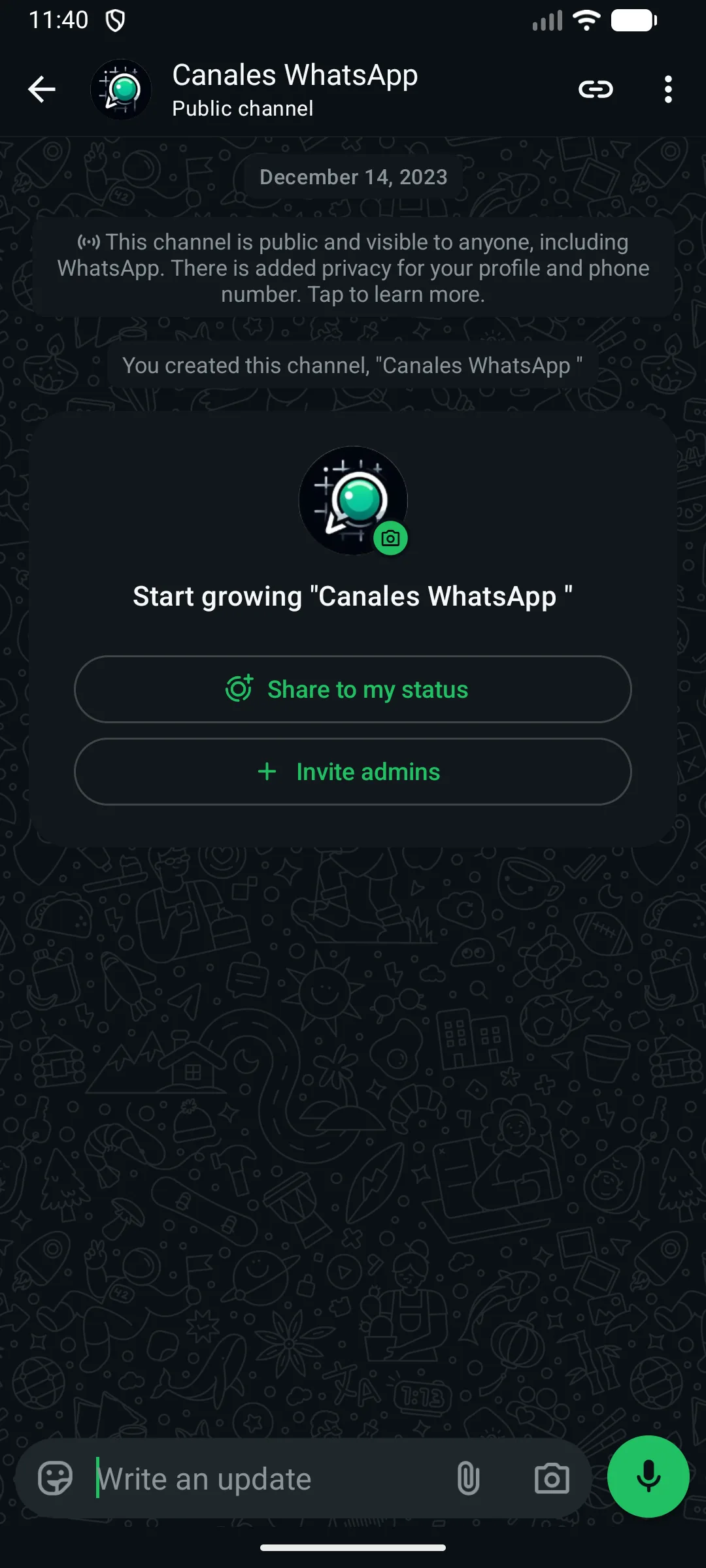
Here's what a channel looks like from the inside: WhatsApp reminds you it's public and that your profile and number stay protected.
What is a WhatsApp channel
A WhatsApp channel is a broadcast tool where a person or brand posts messages and their followers receive them, without being able to reply. It runs in one direction: the admin writes, and everyone else only reads, reacts with emojis, or votes in polls. Think of it as a digital bulletin board inside the app.
WhatsApp launched channels in September 2023 to fill a gap: getting news out to a lot of people at once without cluttering your everyday chats. That's why they live in their own tab, Updates, set apart from your conversations. So what your group of friends is saying doesn't get mixed in with what a newspaper or your favorite store posts.
The difference from a normal chat is simple. In a chat you talk and people talk back; in a channel you only receive. Nobody sees your number, not even the person running it, and followers can't see each other either. It's following someone, not chatting with them.
Who uses them? A local newspaper posts breaking news the second it happens. A neighborhood store sends its sale to thousands of followers with a single message. And an artist shares a concert date before it lands anywhere else. Creating one is free and anyone can do it; you'll find the steps and the limits in the WhatsApp Help Center.
What a WhatsApp channel is for
A WhatsApp channel is for sending messages to a lot of followers at once, without starting a group or asking for their numbers. The admin posts and everyone else reads; all they can do is react with emojis or vote in polls. It's pure one-to-many broadcasting.
That setup fits a lot of very different situations. Think of any case where someone has something to say and a crowd of people who want to hear it, but with no need for a conversation back.
Who's it worth it for? Anyone who informs a lot of people and doesn't need a reply. If what you want is to talk and get answers, a group or a regular chat serves you better.
Businesses and stores. A neighborhood store tells its followers that the sneakers everyone wanted are back in stock, or drops a sale half an hour before opening. One message, zero cost, and whoever follows finds out right away.
Creators and artists. A band posts the dates for its new tour before anywhere else, or an illustrator shows the sketch for their next piece. Fans get the news directly, without depending on whether a social feed's algorithm decides to show it to them.
News and media. A local newspaper sends the breaking headline the moment it happens: a road closure, the game's final score, a storm warning. It arrives like any other notification, no need to open the website.
Schools, clubs, and associations. A school's parent group announces there's no cafeteria tomorrow, or a running club confirms Sunday's race is still on despite the forecast. One notice for hundreds of families, without a chaotic group.
Personal use. A neighborhood association shares when the plumber is coming to the building, or a hiking club's organizer posts this weekend's route. Followers find out without seeing anyone else's phone number.
How WhatsApp channels work
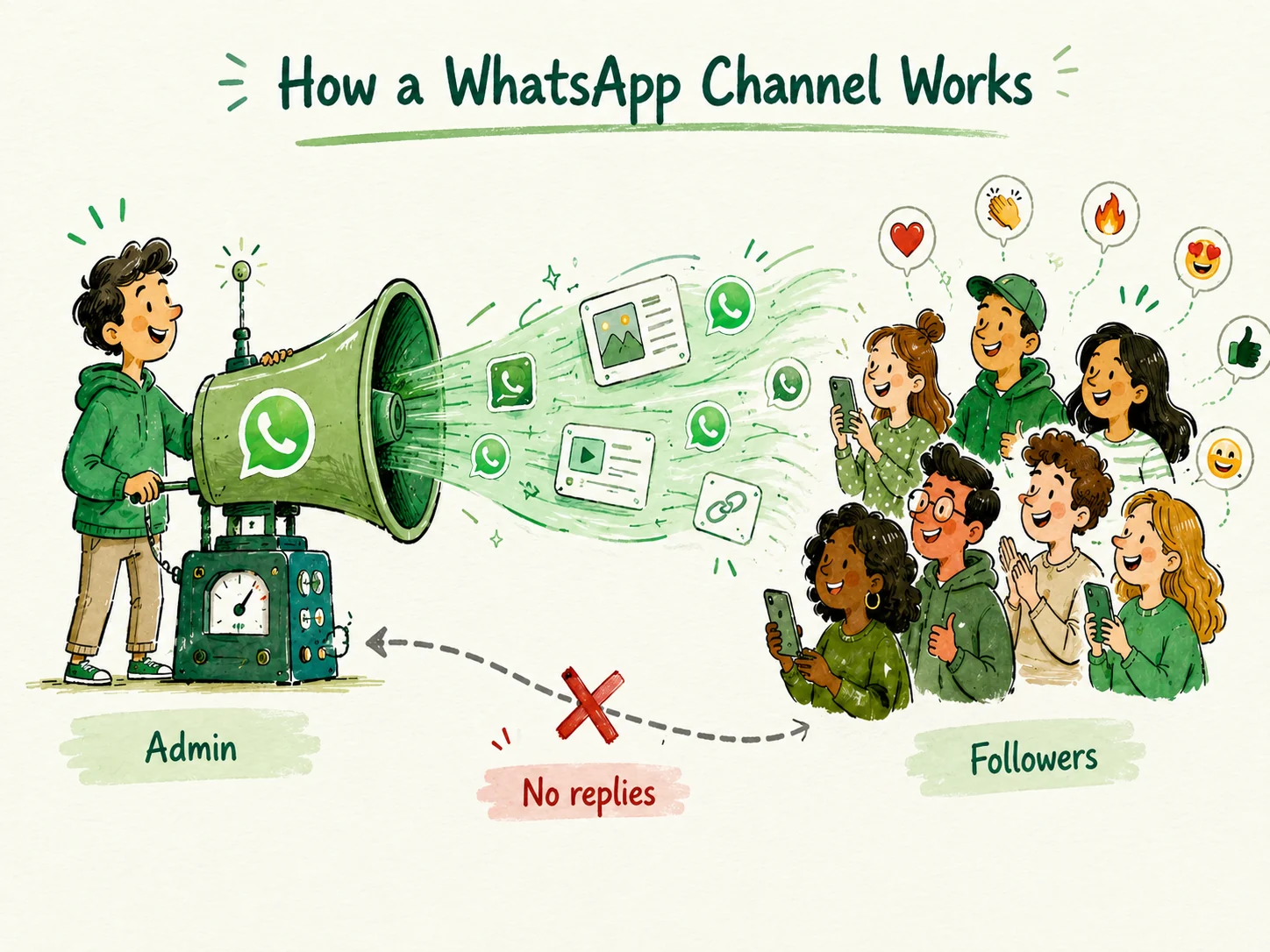
A WhatsApp channel works like a one-way loudspeaker: the admin posts messages and followers only receive them. It's not a conversation. Nobody can reply or write back. Followers can only react with emojis and vote in whatever polls get posted.
Channels live in the Updates tab, separate from your personal chats. That's where the channels you follow show up, sorted by their most recent activity. When the admin posts something, it reaches you just like a normal notification, but when you open it you don't land in a chat: you land on a wall of posts that only that person (or brand) feeds.
Think of it like the bulletin board in a building lobby. Someone pins the note and everyone else reads it. Nobody writes on top of it.
That's the key to how a WhatsApp channel works: the flow always runs the same way, from the one who posts to the ones who follow. Followers can't see each other and can't talk inside the channel.
Each channel keeps a history of its posts, so if you start following one today you can scroll up and read what came before. That history doesn't last forever: WhatsApp keeps a channel's content on its servers for up to 30 days, according to the WhatsApp Help Center. After that, posts disappear from the wall for both the admin and the followers, and the admin can delete them sooner whenever they want.
The flow runs in one direction: the admin posts and followers only receive, react, or vote.
Admin: post text, photos, videos, links, stickers, and polls.
Admin: see how many people follow the channel and how many reactions each post gets.
Admin: delete old posts whenever they want.
Follower: read everything that's posted.
Follower: react with emojis to each post.
Follower: vote in polls.
Follower: forward a post to a chat or another contact.
Channel vs group vs community vs broadcast list
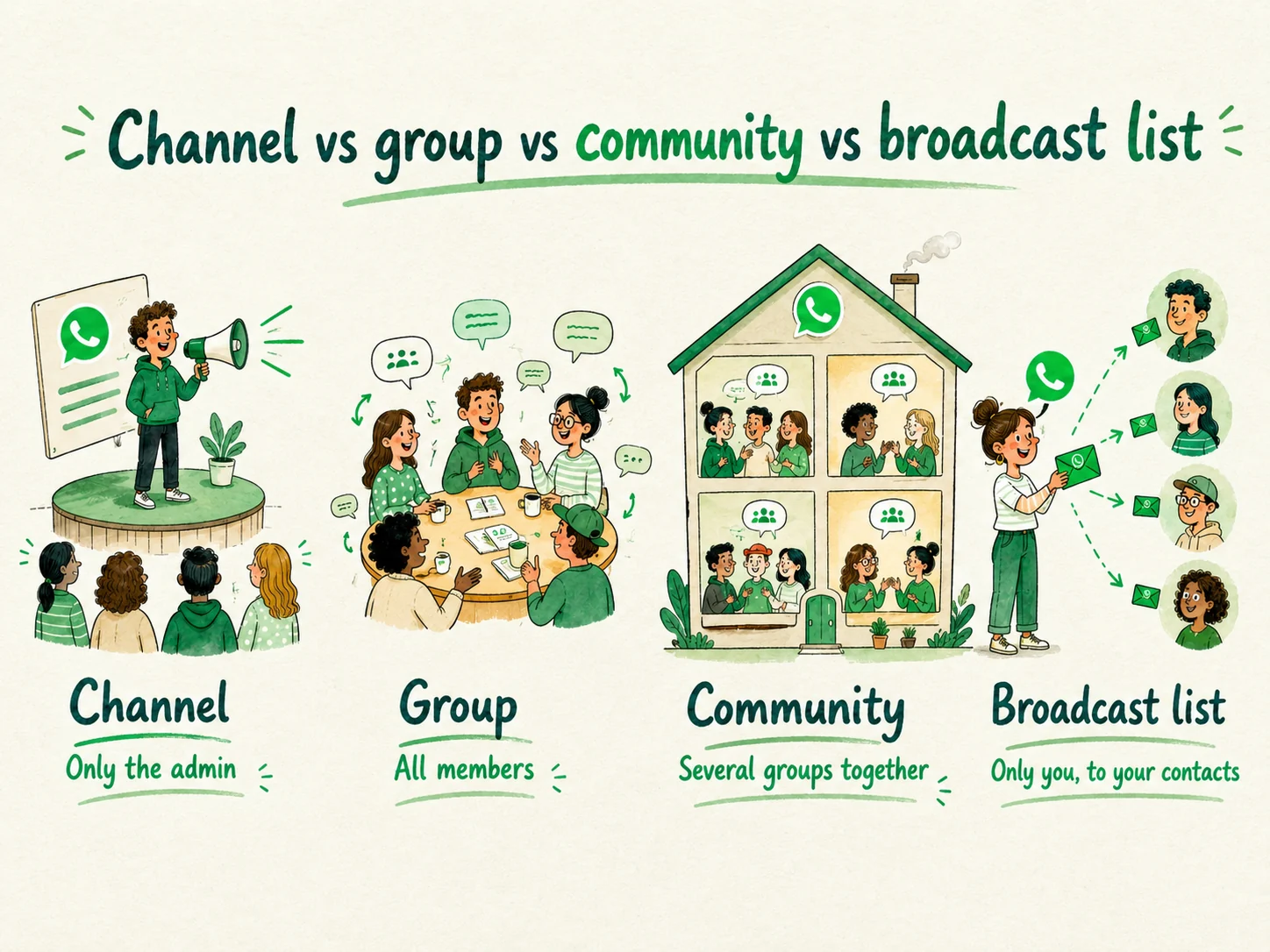
The difference between a WhatsApp channel and a group comes down to who talks. A channel is public, one-way broadcasting: the admin posts and you, as a follower, can only react. A group is a conversation between members who write. A community groups several groups under one umbrella, and a broadcast list sends a message to your saved contacts.
These four things get mixed up a lot because they share the same app, but they work differently. The table makes it clear at a glance.
A note on the numbers: a channel has no cap on followers, while a group tops out at 1,024 members and a community can link up to 50 subgroups, with an announcement channel that reaches around 5,000 members. A broadcast list, on the other hand, only reaches 256 recipients, and only if they have your number saved as a contact.
The most common mix-up isn't channel versus group, it's channel versus broadcast list. Both send a message to a lot of people at once, and that's where the resemblance ends. With a broadcast list, the message arrives as a normal private chat: you see who gets it, they see that you're the one writing, and it only works with contacts who have your number saved. It's an individual message dressed up as a mass send.
A channel is the opposite. Anyone can follow it without knowing you or giving you their number, you have no idea who's on the other side, and the post shows up in the Updates tab, not in their chat inbox, as the WhatsApp Help Center explains. Think of the broadcast list as sending the same text to your address book, and the channel as putting up a sign in a store window: whoever walks by reads it, but you don't know who they are and you don't have their number.
At a glance: who writes in each one. The channel is the only one where only the admin posts.
Channel
Group
Community
Broadcast list
Who can write
Only the admin
All members
Members, depending on each group
Only you
Your number / identity
The admin can't see your number
Everyone sees your number
Visible in the groups
The recipient sees your normal chat
Size / reach
Unlimited followers
Up to 1,024 members
Links up to 50 subgroups; announcement channel up to ~5,000 members
Up to 256 saved recipients
Where it lives in the app
Updates tab
Chats tab
Communities tab
Chats tab
Typical use case
A store tells followers about a sale
Friends plan a dinner
A school with a group per class
Wishing 20 contacts happy holidays
Are WhatsApp channels private and secure?
WhatsApp channels are safe for the people who follow them in the way that matters most: when you follow a channel, your phone number and your profile stay hidden. The admin can't see them, and other followers can't see you either. Following is a private action.
Here's what's protected and what isn't, no sugarcoating. What stays hidden: your number, your photo, and your identity as a follower. You can follow your city government's channel or a neighborhood store's without anyone on that list knowing you're there. Nobody in the channel gets your details just because you hit follow.
Now the other side, the part almost nobody tells you. Channels don't use end-to-end encryption, unlike your personal chats. They're a broadcast tool, built to reach a lot of people, so what a channel posts isn't a secret: anyone can forward it, screenshot it, or share it outside the app. Treat every post as something that could end up seen far from where it started.
There's a key difference depending on your role. Following is private, as we just saw. Running a channel isn't: if you create one, its name is public and shows up in the directory for anyone to find. Reading is one thing; posting is another.
Two quick tips. Don't tap links from channels you don't know, especially if they promise prizes or ask for personal details; scams live here too. And if a channel makes you uncomfortable or looks fake, unfollow it and report it from the channel's own settings. For the official details, check the WhatsApp Help Center.
Can you see who follows a channel?
No. Finding out who follows a WhatsApp channel by name isn't possible: the admin only sees the total follower count, never the list or each person's identity. And followers can't see each other either. Everyone is anonymous inside the channel.
Let's break it down, because there are two points of view.
If you're the one following a channel, you expose nothing. Your name doesn't appear, nor your photo, nor your phone number. The most common worry is this: "if I follow a channel, will they know my number?" The answer is no. You can follow your soccer team's channel or a store's without anyone tracking you. Reacting with an emoji or voting in a poll doesn't reveal who you are either.
If you're the one running the channel, you see a counter. You know you have 3,000 followers, for example, but not who they are or how to reach them privately. You post for an audience you can't see.
WhatsApp designed it this way for privacy. A channel can have a huge number of people, and exposing all that data would be a serious problem. So anonymity comes built in, for both sides.
How to find and follow WhatsApp channels
To find WhatsApp channels you have two ways: search the directory inside the app, or open an invite link someone shares with you. Either way, following a channel is free and all it takes is a tap on the follow button. From then on, its posts reach you in the Updates tab.
The first way is the app's own directory. Open WhatsApp, go to the Updates tab, and tap the button to explore or search for channels. There you can type a specific name or filter by country and category (news, sports, entertainment, and more). When you see one you like, tap Follow.
The second way is invite links. A channel can share its link on a website, on social media, or in a chat. When you tap it, WhatsApp opens straight to that channel and all you have to do is hit follow. It's the usual way to come across channels that might not stand out in the directory.
One important warning: while you search, you'll run into fake channels that impersonate brands or well-known people. Some are pure spam and others are out to scam you. Before you follow one, check that the name really matches, and be wary of any that promise prizes or ask for personal details. A legitimate channel will never ask you for your password or a payment to "verify" you.
This is just the first step. For the full guide, with screenshots and every detail, see how to follow a WhatsApp channel.
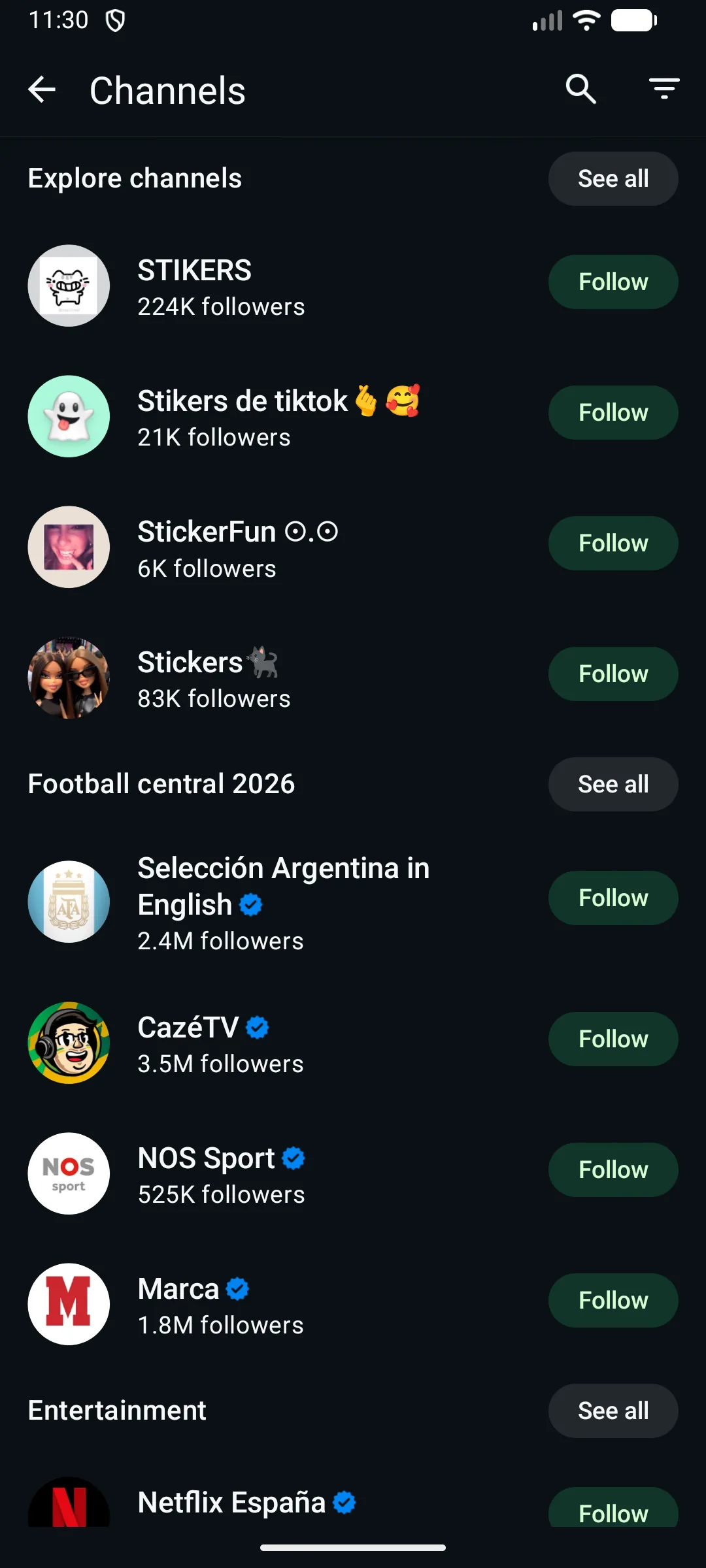
The directory (Explore button) groups channels by category, with their follower count and a button to follow.
Yes, it's free: creating, following, and posting in a WhatsApp channel costs nothing, just like the rest of the app. There's no monthly fee and no one-time payment. The only thing you spend is your cellular data or your Wi-Fi when you send and receive posts.
There's no subscription to have a channel or to follow someone else's. Anyone can open one from the Updates tab without entering a card or paying anything. A small business can tell all its followers about a sale without spending a dime to send it.
At Cannes Lions in June 2025, Meta announced it would start adding paid subscriptions to channels, rolling them out gradually through 2026 and unevenly by country. The idea is that an admin could charge a monthly fee for a "paid" part of their channel, while basic use (creating, following, and posting) stays free. So don't stress: creating or following a channel won't cost you money, and if one of those features reaches your country, it'll be optional and clearly shown before you pay anything (eMarketer).
If you're worried about a specific charge, check the official Help Center first. As of today, basic use is free from start to finish.
Feeling up for it? Here's how to create a WhatsApp channel step by step.
WhatsApp channels take up space and use data mostly when you download the photos and videos they post. Text barely weighs anything. The real cost comes with media, so a channel that only writes hardly touches your storage, while one full of videos does pile up.
The key is auto-download. By default, WhatsApp saves images and videos to your phone as they arrive, and that's where your storage fills up without you noticing. If you follow a channel that posts a video a day, in a few weeks you've got hundreds of megabytes taken up. If you follow one that only sends text, the weight is minimal.
Worried about your phone's storage? Go to Settings, then Storage and data, and turn off auto-download for photos and videos. That way only what you tap gets downloaded. And if a very active channel is eating your space, unfollow it: it's one tap and you get room back right away.
How to create your own WhatsApp channel
Anyone can create a WhatsApp channel for free, with no special permissions or verifications. All you have to do is go to the Updates tab, tap the + symbol, and choose "Create channel." In a few minutes you'll have your own space to post and let people follow you.
The process is short. You open Updates, tap the + sign at the top right, and select the option to create a channel. WhatsApp asks you for a name, and that name is the most important part of the whole step: it's what people see and what they type in the search box when they try to find you in the directory. Think it through before you write it.
After that, you can add a description that explains what your channel is about and an icon or photo to identify it. It doesn't have to be perfect from the start: the name, the description, and the image can all be changed later from the channel's settings. Once it's created, you can start posting your first message.
If you want the screen-by-screen details, with screenshots and all the privacy settings, there's the full guide on how to create a WhatsApp channel step by step.
Now, an honest tip. Creating the channel is the easy part, a couple of minutes. The hard part comes after: getting people to follow you and keeping up a posting rhythm without giving up after two weeks. An empty or dead channel is useless, so think ahead about what you're going to say and how often.
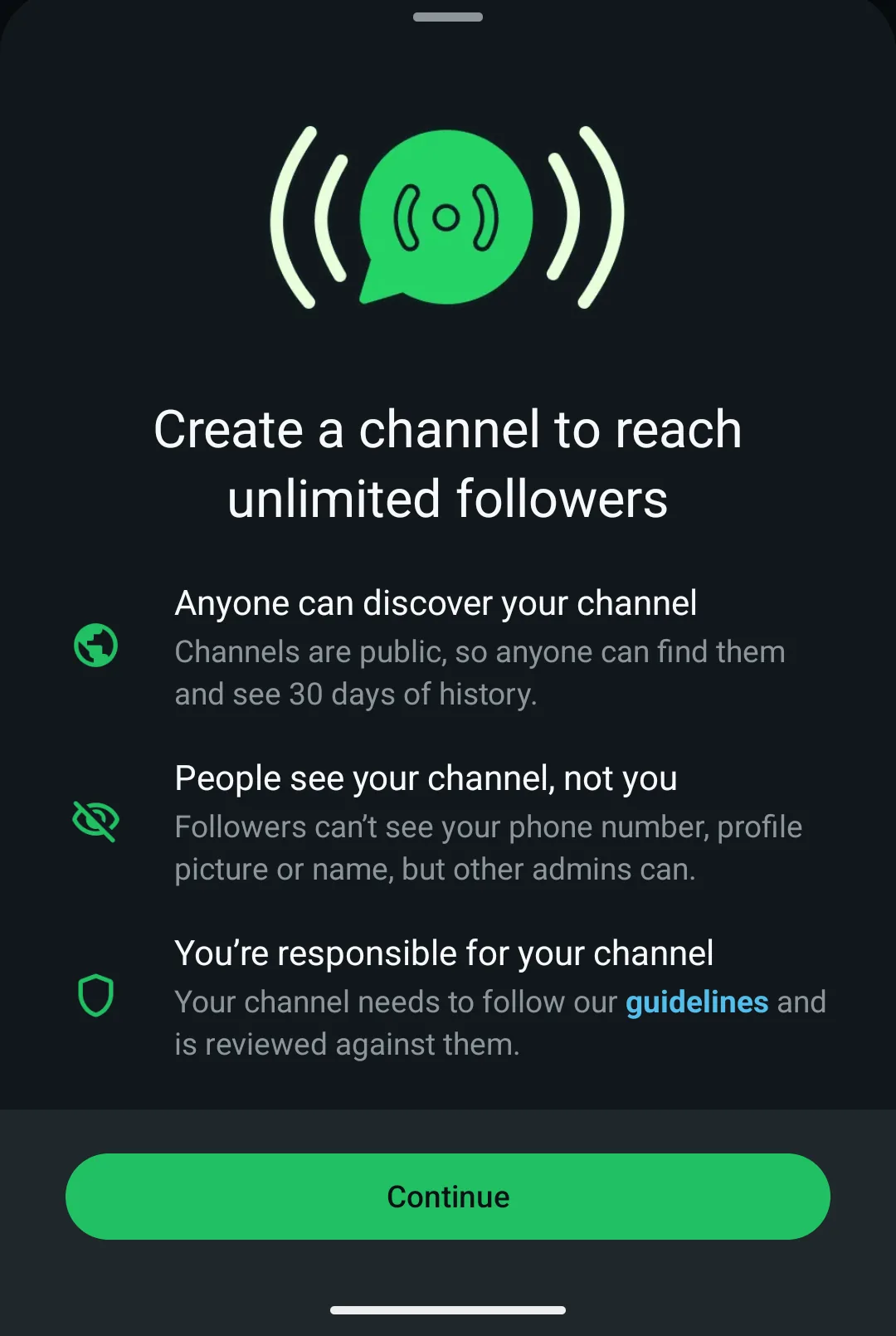
When you create a channel, WhatsApp sums up what matters: unlimited followers, it's public with 30 days of history, and your number stays hidden from followers.
Frequently asked questions about WhatsApp channels
How do I mute a WhatsApp channel?
Open the channel, tap its name at the top, and turn on the mute option. You'll stop getting alerts, but new posts will still show up in the Updates tab when you go in yourself. It's handy if you want to follow a channel without your phone buzzing every time it posts.
How do I unfollow a channel?
Go into the channel, tap its name at the top, and choose the unfollow option. It disappears from your Updates list instantly. Since the admin has never seen your number or your profile, they don't find out you've left. You can follow it again whenever you want.
Can I see how many followers a channel has?
Yes. Many channels show their follower count next to the name, in the channel's info. It's public data that helps you judge whether it's worth following. Keep in mind: the admin only sees the total figure, never who you are or your phone number.
Can I share or forward a post from a channel?
Yes. Press and hold the post, then choose forward or share to send it to a chat, a group, or outside WhatsApp. The message travels with a link to the channel, so whoever gets it can follow with one tap. It's the most common way for a channel to grow.
Do WhatsApp channels work on the computer (WhatsApp Web)?
Yes. From WhatsApp Web and the desktop app you can follow, read, and react to channels in the Updates tab, just like on your phone. Full creation and management work from the computer too, though the usual route is still the phone. More details in the WhatsApp Help Center.
Can I make money with a WhatsApp channel?
Not with native monetization open to everyone yet: WhatsApp doesn't share revenue for posting or for followers. Meta announced paid subscriptions in June 2025 that, according to eMarketer, are rolling out gradually through 2026 and still unevenly by country. In the meantime, many admins earn through sponsorships and affiliate deals.
Ready to start your own channel?
A WhatsApp channel is the most direct way to reach a brand's, a news outlet's, or a creator's audience without giving out your number or joining a chaotic group. The admin posts, followers read and react, and it all happens in the Updates tab. Creating one is private and free.